# · 編輯暱稱

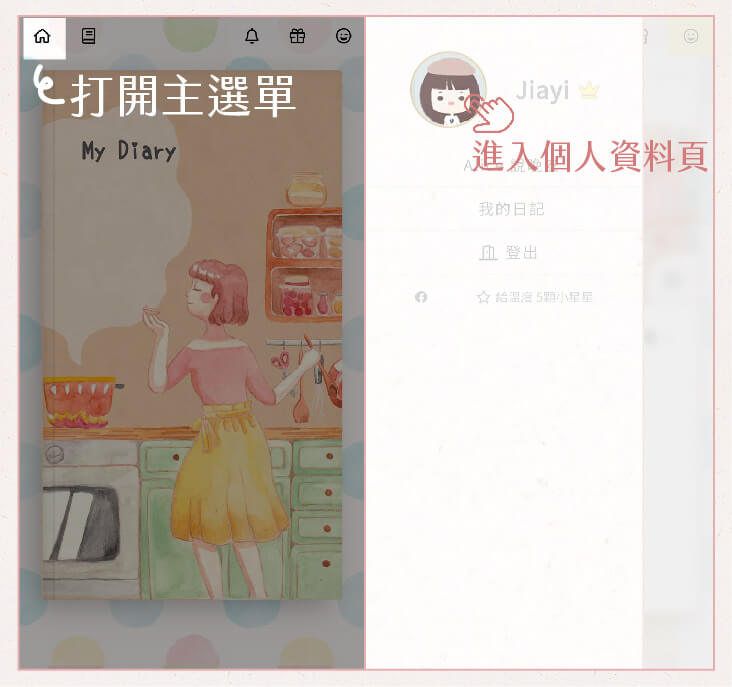
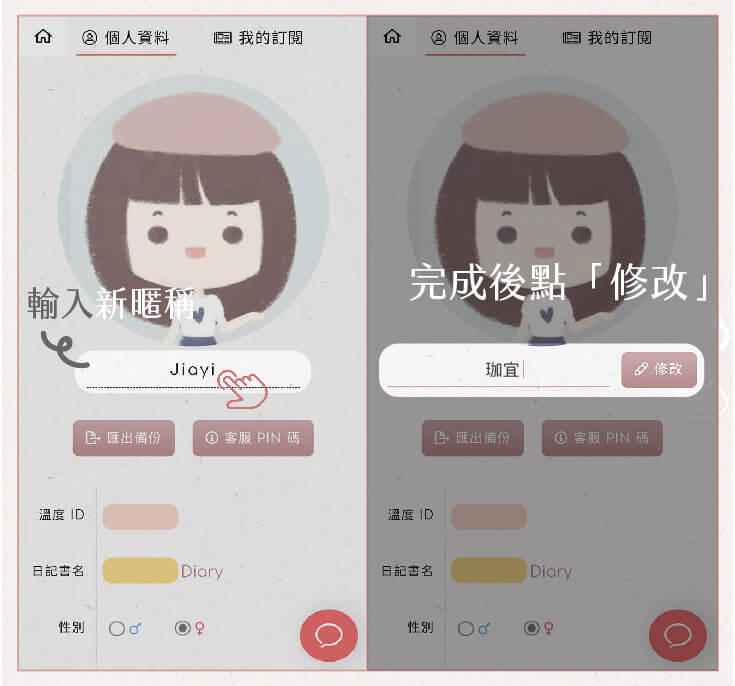
點選主選單的大頭貼，進入個人設定頁，編輯暱稱（改完記得按「修改」呦）。

<div align="left"><figure><img src="/files/-MC1ZX7lqcA-sV9qbfZE" alt="溫度日記 App 編輯暱稱教學圖，隨心修改自己的專屬稱呼！從喜歡的顏色、動物、天氣、電影角色、祈願，或者歌詞來發想，例如「橘白」、「晴天娃娃」、「日日是好日」，甚至像是「時間把習慣換了」這樣的浪漫選擇！在這裡，每個名字都代表獨一無二的日記主人。"><figcaption></figcaption></figure></div>

<div align="left"><img src="/files/JepZ7KCJcvAa1G6PEYzr" alt=""></div>


---

# Agent Instructions: Querying This Documentation

If you need additional information that is not directly available in this page, you can query the documentation dynamically by asking a question.

Perform an HTTP GET request on the current page URL with the `ask` query parameter:

```
GET https://faq.hearty.me/tutorial/nickname.md?ask=<question>
```

The question should be specific, self-contained, and written in natural language.
The response will contain a direct answer to the question and relevant excerpts and sources from the documentation.

Use this mechanism when the answer is not explicitly present in the current page, you need clarification or additional context, or you want to retrieve related documentation sections.